Activate Microsoft UET Consent Mode in 2 Clicks with Biskoui
After the implementation of Google Consent Mode v2, Microsoft is now strengthening the rules of the game.
Since May 5, 2025, using Microsoft Advertising services requires implementing Microsoft UET Consent Mode, in accordance with Microsoft's new guidelines, which apply to advertisers operating in the European Economic Area (EEA), the United Kingdom, and Switzerland.
What is Microsoft UET Consent Mode?
Microsoft UET Consent Mode is a mechanism introduced by Microsoft to allow its Universal Event Tracking (UET) advertising tags to respect user consent choices regarding cookies and tracking.
Specifically, it allows UET tags to:
- Enable or disable data collection based on user consent
- Preserve advertising performance within a framework that complies with privacy expectations
This system follows the same logic as Google Consent Mode v2, ensuring that advertising platforms act transparently and compliantly with personal data.
Activate Microsoft UET Consent Mode in Two Steps
1. Install Microsoft Advertising
- Log in to the biskoui dashboard at admin.biskoui.ch
- Go to the Services menu
- Add the Microsoft Advertising service with your choice of integration mode
2. Activate Microsoft UET Consent Mode
- Log in to the biskoui dashboard at admin.biskoui.ch
- Go to the Services menu
- Open the Consent Modes tab
- Activate Microsoft UET Consent Mode via the dropdown menu
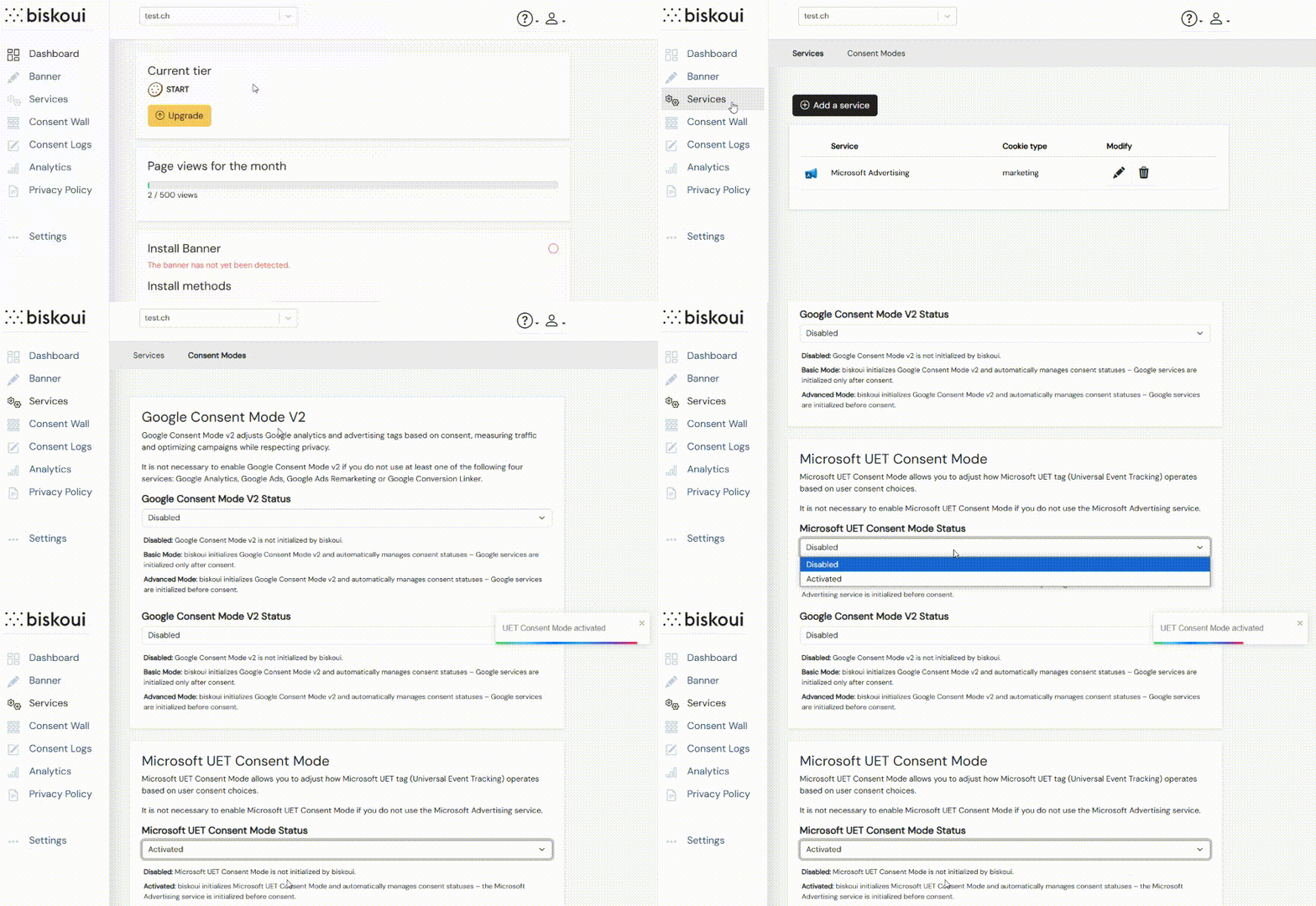
Note that Google Consent Mode v2 is also activated from the Consent Modes tab. Learn more about Google Consent Mode v2 Basic mode and Advanced mode.
Which Services Drive Microsoft UET Consent Mode?
Microsoft UET Consent Mode is driven by Microsoft Advertising services configured in Biskoui. Accepting unrelated marketing services, such as Facebook Ads or Google Ads, does not update Microsoft UET consent signals.
| Accepted Biskoui service | Microsoft UET Consent Mode update |
|---|---|
| Microsoft Advertising | Microsoft UET consent is granted |
| Facebook Ads, TikTok Pixel, Google Ads, or other non-Microsoft services | No Microsoft UET Consent Mode update |
Verify Microsoft UET Consent Mode is Working
Once Microsoft UET Consent Mode is activated in Biskoui, it's essential to verify that your UET tags respond correctly to user consent choices.
For this, Microsoft provides an official Chrome extension: UET Tag Helper. This tool allows you to:
- Detect UET tags present on your site
- Verify in real-time if they are loaded correctly
- Ensure they properly respect the consent state transmitted by Biskoui
Verification Steps:
- Install the UET Tag Helper extension from the Chrome Web Store
- Activate it on your website
- Simulate different consent scenarios via the Biskoui banner
- Verify that UET tag behavior adjusts accordingly (delayed or limited loading in the absence of consent)
This verification guarantees complete compliance while ensuring proper functioning of your Microsoft Advertising campaigns.
Summary
With the introduction of Microsoft UET Consent Mode, Microsoft in turn reinforces the importance of rigorous and transparent consent management in the advertising ecosystem.
Thanks to Biskoui, you can meet these new requirements in just a few clicks, without technical complexity, while guaranteeing optimal compliance in the EEA, United Kingdom, and Switzerland.
This new integration confirms our commitment: to offer you a consent management platform that is simple, compliant, and sustainable.
Questions About Microsoft UET Consent Mode?
Don't hesitate to contact our team via support@biskoui.ch for any questions regarding the implementation of Microsoft UET Consent Mode.