Guide: Blocking Vimeo Videos with biskoui
Introduction
This guide explains how to block Vimeo videos until users provide consent, helping you comply with data protection regulations.
Our consent management platform helps you comply with regulations governing the management of video content provided by third-party services.
Vimeo Video Integrations and the nLPD
Vimeo is a popular service for integrating videos on your website. However, like YouTube, there are important data protection considerations. As of September 1, 2023, embedding a Vimeo video on your website without consent is no longer compliant with Swiss and European privacy laws.
Why is consent required?
When Vimeo videos are embedded on your website, the user's IP address is automatically sent to Vimeo's servers in the United States as soon as the page is loaded, even if the user does not click on the video.
The service also deposits a series of cookies to study user behavior.
An IP address is personal data, and sending it without explicit consent is a violation of both the Swiss Data Protection Act (nLPD) and the European General Data Protection Regulation (GDPR).
By blocking these videos until users give their consent, your website will not only comply with legal obligations, but it will also boost user confidence by demonstrating a commitment to their privacy.
How Does biskoui Block Vimeo Videos?
biskoui can block your Vimeo videos to bring your site into compliance with nLPD and the European GDPR.
We have developed a system that will block your Vimeo videos until the user's consent has been collected.
Your Vimeo videos will be displayed as follows to indicate to visitors that their consent is required:

If the user clicks on "Allow Vimeo", consent will be activated for Vimeo only. Our blocking system will immediately disappear, allowing the user to play the Vimeo video.
How to Block Vimeo Videos with biskoui
A. Add Vimeo Service (One-Time Operation)
- Connect to the biskoui console
- Go to Services and click Add a service
- In the list of services, search for Vimeo
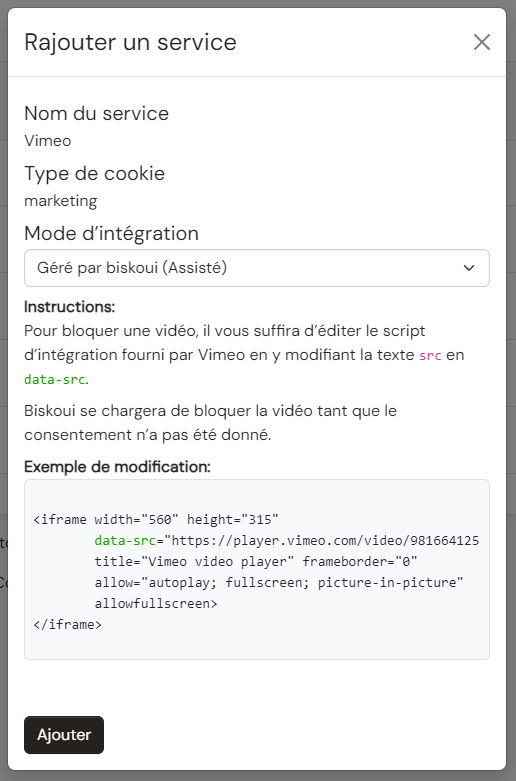
- Once the service has been selected, select Managed by biskoui (Assisted) and click Add
B. Enable Blocking on Vimeo Videos
Now that the Vimeo service has been added, you'll need to modify the integration scripts for your Vimeo videos. Here's how to do it:
When you want to embed a Vimeo video on your website, Vimeo will provide you with an "iframe" embedding script like this one:
<iframe
  src="https://player.vimeo.com/video/759911151?h=3a3669479e&color=ffffff&title=0&byline=0&portrait=0&badge=0"
  width="640"
  height="360"
  frameborder="0"
  allow="autoplay; fullscreen; picture-in-picture"
  allowfullscreen
>
</iframe>
To activate video blocking, simply modify the parameter text calling the source src= and replace it with data-src=.
Here's what it will look like in practice:
Before modifying the source parameter:
src="https://player.vimeo.com/video/759911151?h=3a3669479e&color=ffffff&title=0&byline=0&portrait=0&badge=0"
After modifying the source parameter:
data-src="https://player.vimeo.com/video/759911151?h=3a3669479e&color=ffffff&title=0&byline=0&portrait=0&badge=0"
Complete example:
<iframe
  data-src="https://player.vimeo.com/video/759911151?h=3a3669479e&color=ffffff&title=0&byline=0&portrait=0&badge=0"
  width="640"
  height="360"
  frameborder="0"
  allow="autoplay; fullscreen; picture-in-picture"
  allowfullscreen
>
</iframe>
This simple manipulation of the source parameter will allow biskoui to execute, or not, the video depending on the status of your visitor's consent for Vimeo.
You need to do this modification for each Vimeo video on your website.
What Happens if the User Withdraws Consent?
The next time the page is loaded, the biskoui blocking system will be reinstated until the user accepts the Vimeo service again.
Need Help?
Our support team is available at: support@biskoui.ch